This article contains affiliate links. As an Amazon Associate and through other programs, we earn from qualifying purchases at no extra cost to you. Learn more
Essential Security Starter Kit for New Homeowners
The must-have devices to secure your new home, ranked by priority. As an Amazon Associate, we earn from qualifying purchases.
Table of Contents
SMARTSAFEGEAR SCORE
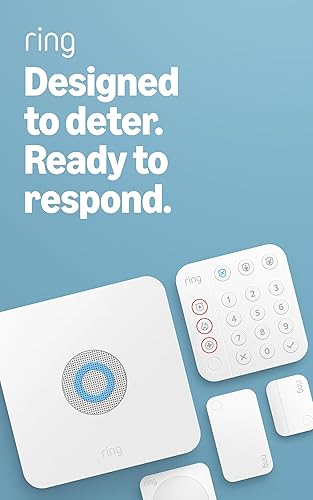
Ring Alarm 5-Piece Kit — Best First Home Security System
~$200 · Complete Starter System
The perfect foundation for a new home. Includes base station, keypad, contact sensor, motion detector, and range extender. Expandable as your needs grow. Optional professional monitoring for $20/mo.
Check Price on Amazon
Schlage Encode Plus — Best Smart Lock for New Home
~$250 · Built-in WiFi + Apple Home Key
First thing to do in a new home: change the locks. Schlage Encode connects directly to WiFi with no hub needed. Create unique codes for family, contractors, and guests.
Check Price on Amazon
Ring Battery Doorbell Plus — Best Entry Point Monitor
~$100 · Easy DIY Install
No wiring needed — perfect for new homeowners who don’t want to drill into their new home. Head-to-toe HD video captures packages and visitors. Installs in under 10 minutes.
Check Price on Amazon
Wyze Cam Pan v3 — Best Affordable Indoor Camera
~$34 · 360° Pan & Tilt
Monitor your new home inside and out at an unbeatable price. Color night vision, motion tracking, and two-way audio. Add multiple cameras as you learn your home’s blind spots.
Check Price on Amazon
Door Reinforcement Lock — Best Physical Security Upgrade
~$25 · 800lbs Force Resistance
Smart tech is great, but don’t forget physical security. This childproof lock withstands 800lbs of force and installs in minutes. Perfect complement to your smart lock.
Check Price on AmazonCongratulations on your new home! Among the excitement of moving in, security often gets overlooked. But the first 30 days in a new home are critical. Previous owners, contractors, real estate agents, and even old neighbors may still have keys or access codes. Here is exactly what to do to secure your new investment from day one.
First 30 Days Priority List
Change all locks immediately. Install a video doorbell. Set up at least one security camera. Add entry sensors to doors and first-floor windows. Update your homeowners insurance with your security setup for a discount.
Week 1: Lock Down Access
Change All Locks Immediately
This is the single most important step. You have no idea how many copies of your keys are floating around from the previous owner, their family, dog walkers, housekeepers, or contractors. A smart lock is the ideal replacement because you can create and revoke digital access codes at any time without re-keying.
Change Garage Door Codes
If your home has a garage door opener, reset the access code. Previous owners may have shared it with neighbors or service providers. Consult your opener manual for the reset procedure, which usually takes under 5 minutes.
Check All Windows and Sliding Doors
Walk through every room and test each window lock and sliding door lock. Replace any that are broken or loose. Add a security bar to sliding glass doors for extra protection since these are a common weak point.
Week 2: Set Up Basic Monitoring
Install a Video Doorbell
Your front door is the most common entry point for both burglars and package thieves. A video doorbell gives you 24/7 monitoring, visitor alerts, and a visual record of everyone who approaches. Battery-powered models install in 15 minutes. See our doorbell buyer guide.
Add Indoor and Outdoor Cameras
Start with two cameras: one covering the front of your home (near the garage or driveway) and one indoor camera covering the main living area. This basic setup gives you coverage of the most vulnerable areas. Budget option: two cameras under $100 total.
Set Up Door and Window Sensors
Entry sensors on your main doors and ground-floor windows alert you instantly when something opens unexpectedly. Most wireless sensors stick on with adhesive and pair with a hub through an app in under a minute each.
Week 3: Improve Exterior Security
Improve Outdoor Lighting
Dark areas around your home are invitations for trouble. Add motion-activated lights near every entry point, along walkways, and in the backyard. Solar-powered motion lights cost $15-30 and require zero wiring.
Trim Bushes Near Windows
Overgrown bushes and hedges near ground-floor windows provide concealment for burglars. Trim vegetation below window height so anyone crouching near a window would be visible from the street.
Add House Numbers and a Mailbox
Clearly visible house numbers help emergency responders find your home quickly. Place them where they are easily readable from the street, and consider illuminated numbers for nighttime visibility.
Week 4: Optimize and Automate
Set Up Smart Home Routines
Connect your cameras, locks, and lights into automated routines. For example: when your smart lock locks at bedtime, cameras switch to high-sensitivity mode and exterior lights turn on. When you leave for work, everything arms automatically.
Meet Your Neighbors
Neighbors who know you are the best free security system. Introduce yourself, exchange phone numbers, and let them know what vehicles belong at your home. A community that looks out for each other deters crime more than any device.
Update Your Insurance
Many homeowners insurance providers offer 5-20% discounts for smart security systems. Contact your insurer and let them know about your cameras, alarm sensors, smart locks, and monitoring setup. The savings can pay for the devices within a year or two.
Recommended Starter Kit for New Homeowners
Smart lock ($130-200) + video doorbell ($50-100) + 2 cameras ($35-80 each) + entry sensors ($20-40) = $270 to $500 total. See our product comparison guide to find the right devices for your budget.
Get Room-by-Room ChecklistFrequently Asked Questions
Should I change the locks when I buy a house?
Absolutely. You do not know how many key copies exist from previous owners, realtors, contractors, or service providers. Changing locks or installing smart locks should be done before you even move in.
How much should a first-time homeowner spend on security?
$200-500 covers a solid starter system with a smart lock, video doorbell, camera, and sensors. This is a one-time cost (plus optional cloud subscriptions of $3-10 per month). Many insurance discounts help offset the investment.
Do I need a security system if I live in a safe neighborhood?
Yes. Property crime occurs in all neighborhoods, and safe neighborhoods are sometimes targeted because residents are less vigilant. A basic smart security setup provides peace of mind and valuable evidence if anything does happen.